
Programmable Calculator
Perform advanced calculations with our free Programmable Calculator online. This tool allows you to perform basic arithmetic, parentheses operations, and even store custom formulas, mimicking the flexibility of a physical programmable calculator. Perfect for students, engineers, and professionals in Ireland. Explore more tools in our Casio & Generic Calculators section.
📌 What Is the Programmable Calculator?
The Programmable Calculator is an online calculator that allows users to enter expressions, perform arithmetic operations, and store custom formulas in memory for repeated use. It’s ideal for complex calculations or tasks that require repeated formulas.
⚙️ How the Programmable Calculator Works
-
Click the calculator buttons to input numbers, operators, and parentheses.
-
Use STO to store a formula in memory.
-
Use RCL to recall the stored formula into your current expression.
-
Click “=” to evaluate your expression.
-
Click “AC” to clear the display.
This makes it easy to handle repeated calculations or long formulas without retyping them.
You can also go through - Sharp Style Calculator
✅ Why Use This Calculator?
-
Free & Quick: Perform calculations instantly without downloads or sign-ups.
-
Programmable Memory: Store and recall custom formulas easily.
-
Versatile: Handles arithmetic, parentheses, and complex expressions.
-
Ideal for Students & Professionals: Works on mobile, tablet, and desktop.
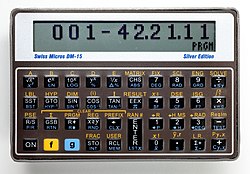
ℹ️ Additional Information on Programmable Calculators
Programmable calculators allow users to store formulas or sequences of operations that can be reused later. This reduces repetitive typing and ensures consistent results, making them popular among students, scientists, and engineers.
❓ FAQs – Programmable Calculator
Q1. What is the Programmable Calculator?
It’s an online calculator that lets you enter expressions and store custom formulas for repeated use.
Q2. Who can use this calculator?
Anyone needing advanced calculations, repeated formulas, or complex arithmetic operations.
Q3. How accurate is it?
It performs calculations just like a physical programmable calculator, but check your formulas carefully for accuracy.
Q4. How do I store and recall a formula?
Use STO to save a formula and RCL to recall it into your current expression.
Q5. Is this calculator free?
Yes, it’s completely free and works on any device.